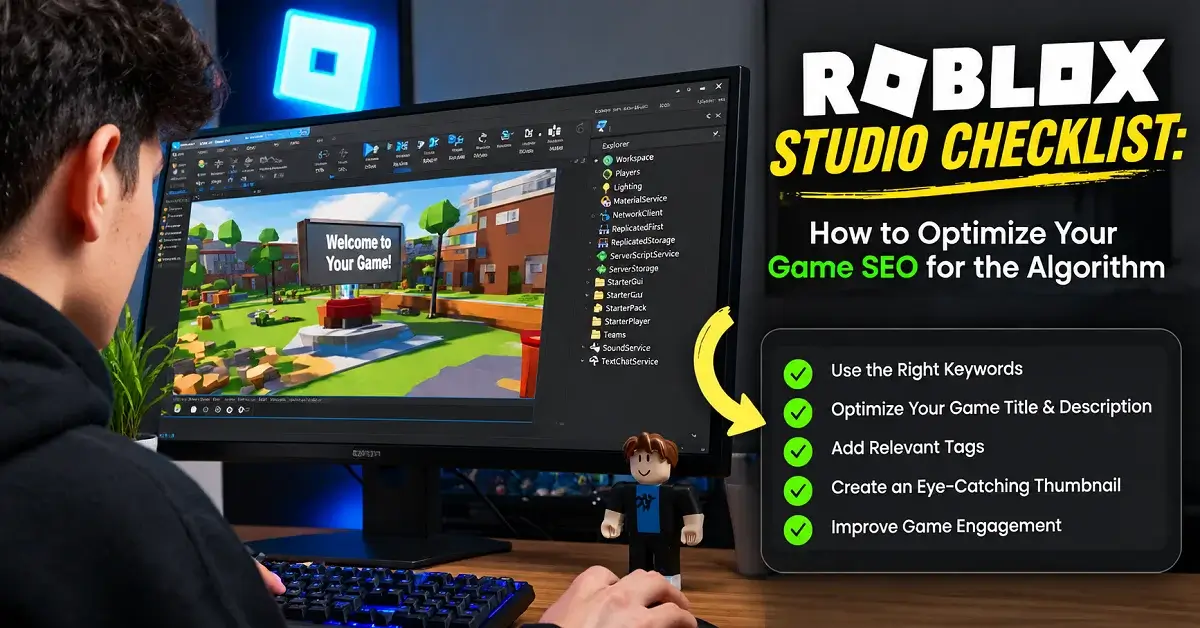
Whether you are launching a simulator., role-playing game, or competitive experience, your Roblox Studio workflow should connect technical performance with player satisfaction. Roblox’s official discovery guidance identifies play-through rate, early player exits, return visits, playtime, and other engagement and monetization signals as important considerations for recommendations. This guide explains how to improve those areas without relying on keyword stuffing or ranking shortcuts.
How This Roblox Game SEO Checklist Was Prepared
This guide brings together official Roblox Creator Hub guidance and practical steps that creators can use to review their game’s discoverability, presentation, performance, and player engagement. Each recommendation should be checked against your own experience and the current Creator Dashboard data rather than treated as a guaranteed ranking formula. Roblox’s discovery systems and dashboard metrics can change, so consult the linked official documentation before making major optimization decisions.
What Is Roblox Game SEO and Why Is It Important?
Roblox Game SEO is the process of improving your experience’s discoverability, presentation, and gameplay quality so the right players can find and enjoy it. Unlike traditional website SEO, Roblox optimization combines relevant metadata and search visibility with in-game engagement, technical performance, and repeat play.
For creators developing content for the Robloxian Verse audience, the priority should be building an experience that matches what players expect from its title and visuals. Better presentation can encourage clicks, but enjoyable gameplay and a smooth first session give players a reason to stay.
How to Choose Search Terms for Your Roblox Experience
Start with your actual gameplay rather than an unverified search-volume figure. Identify your game’s genre, main activity, and most distinctive feature before choosing words for its title and description.
For example, an obstacle course might use a phrase such as “multiplayer parkour obby” if the experience genuinely includes multiplayer gameplay and parkour challenges. Avoid adding popular game names or trending terms that do not describe what players will find.
Use these three checks before publishing:
- Does the title communicate the main gameplay experience?
- Does the description explain the actual features, objectives, and progression?
- Do the icon and thumbnails accurately represent the game?
After publishing, review the available acquisition data in Creator Dashboard to understand which discovery sources bring players to your experience. Remember that Roblox Search and Home Recommendations are different discovery paths, and a keyword alone cannot guarantee recommendation placement.
How Roblox’s Discovery Algorithm Works (2026 Update)
Roblox’s Recommended for You system uses a two-stage process: it retrieves potentially relevant experiences and then ranks candidates for individual players. Current documentation emphasizes lasting engagement, return visits, and monetization rather than one universal ranking trick. The system also evaluates engagement from players who discover experiences organically through Home Recommendations.
The Three Discovery Surfaces You’re Optimizing For
| Discovery surface | What to optimize | What to measure |
|---|---|---|
| Home Recommendations | Click appeal, first-session quality, retention, and social play | Impressions, play-through rate, return visits |
| Search | Accurate titles, descriptions, genre information, and unique positioning | Search-sourced plays and player behavior |
| Discover and Charts | Strong gameplay, audience relevance, and sustained engagement | Traffic source, new players, and returning players |
These surfaces are related but not identical. A paid campaign, search result, or social referral can bring new players, but engagement from those players is not automatically counted as an organic Home Recommendation ranking signal.
Recent Roblox Algorithm Changes You Need to Know
Roblox’s current discovery documentation highlights several points creators should understand:
- Long-term player value matters: play-through rate, early exits, repeat play, and playtime are important indicators.
- Originality matters: repetitive or highly similar experiences, titles, and visuals can reduce discoverability.
- Search is evolving: Roblox documents semantic search capabilities for officially supported languages, helping users find experiences through natural-language queries.
- Visibility can fluctuate: seasonality, competing experiences, and changes in recommendation distribution can affect impressions.
Check Creator Dashboard for any reduced-exposure notices instead of assuming every traffic decline is an algorithm penalty.
Roblox Studio Game SEO Checklist: Step-by-Step Optimization
Use this checklist before publishing a new game or updating an existing experience.
Optimizing Your Game’s Title and Description
Your title should explain the game’s central experience immediately. Your description should tell players what they can do, what makes the game different, and why they should try it.
- Put the main gameplay concept near the beginning.
- Mention distinctive features, such as trading, quests, pets, ranked battles, or multiplayer challenges, only when they exist.
- Write a natural description that helps players understand the objective and progression.
- Remove irrelevant keywords, repeated phrases, and misleading promises.
Example: Instead of a vague title such as “Amazing World,” use “Fantasy Pet Simulator: Hatch, Trade and Explore” when those are genuine features. Robloxian Verse content can use this example to show how precise metadata communicates player intent.
Game Icons and Thumbnails: Getting Higher CTR
Your icon and thumbnail are the storefront of your experience. Use original artwork, clear subjects, readable visual hierarchy, and scenes that reflect actual gameplay.
- Test different compositions that emphasize meaningful gameplay moments.
- Keep each thumbnail distinct rather than publishing near-identical variations.
- Use thumbnail personalization where available and monitor qualified play-through performance.
- Replace artwork that creates expectations the game cannot meet.
Roblox reports that thumbnail personalization produced an average increase of 8.5% in qualified play-through rate during testing. This is an overall reported result, not a guarantee that every experience will see the same improvement. To try this feature, prepare at least two distinct thumbnails that accurately represent your gameplay, activate them where the feature is available, and review your results in Creator Analytics. Focus on meaningful visual differences rather than misleading artwork or nearly identical variations.
Audience Settings: A Setting Most Creators Get Wrong
In Creator Dashboard, review Audience and access settings, along with the Maturity & Compliance Questionnaire. Your answers must accurately represent the content players may encounter. Incorrect maturity information or unnecessary age and regional restrictions can prevent suitable players from accessing your experience. Recheck these settings whenever your content changes.
Roblox Performance Limits You Should Know
Strong Roblox Game SEO cannot compensate for an experience that loads slowly, freezes during combat, or performs poorly on mobile. Roblox’s engine targets 60 FPS by default, giving each frame approximately 16.67 milliseconds to render smoothly. Memory consumption, script execution, network latency, and loading time can all affect the experience.
How to Optimize a Roblox Game for Low-End PCs
Open Roblox Studio and profile your experience before adding more assets or effects.
- Reduce unnecessary geometry: simplify distant scenery and decorative objects.
- Optimize assets: compress textures where appropriate and avoid loading excessive high-resolution content.
- Review scripts: avoid expensive work on every frame when event-driven logic can achieve the same result.
- Use streaming where suitable: instance streaming can help manage large worlds and memory usage.
- Test realistic conditions: check performance on a lower-spec computer and physical mobile devices, not only your development machine.
Roblox documentation gives examples of targeting fewer than 1,000 draw calls and 1 million triangles on a particular baseline device. These are illustrative optimization targets, not universal limits for every Roblox game.
Player Retention and Average Playtime: The Hidden Ranking Factors
Your opening gameplay should demonstrate the experience’s value quickly. Players who spend their first few minutes searching for instructions, waiting through unnecessary loading screens, or encountering confusing objectives may leave before discovering what makes your game enjoyable.
Improve retention by giving players a clear first objective, meaningful early progress, useful tutorials, and an achievable reward. Add depth through progression, quests, collections, or cooperative goals only when these systems strengthen the core gameplay.
Monitor Day 1 and longer-term retention, playtime, and early exits. Avoid artificial delays or repetitive tasks designed only to inflate session duration. The goal is to make players want to return, not to keep them occupied without purpose. Roblox’s discovery documentation specifically emphasizes lasting engagement and repeat play.
Mobile-First: Best Practices for Roblox Optimization on Mobile
A game that runs well on your computer may perform poorly on a phone. Test touch controls, text readability, loading speed, and frame rate on actual devices.
- Make buttons large enough to tap comfortably.
- Keep essential objectives visible without overcrowding the screen.
- Offer scalable visual effects and avoid unnecessary particle systems.
- Test multiplayer, camera controls, and menus in portrait or landscape layouts as appropriate.
- Check memory consumption and performance during longer sessions.
Roblox recommends testing on physical hardware because Studio’s emulation cannot fully reproduce real-world memory constraints, thermal throttling, and input latency.
Using a Roblox Studio Optimization Script and Nilo Workflow
There is no single optimization script that automatically improves Roblox discovery rankings. Use Roblox Studio’s built-in diagnostic tools, including the Developer Console, MicroProfiler, and performance statistics, to identify actual bottlenecks.
If you’re following a community-described Nilo workflow, evaluate its steps individually rather than assuming it is an official Roblox standard. Review third-party scripts before running them, understand what they change, and test each change in a separate development version.
A reliable workflow is simple: profile the game, identify one bottleneck, make a controlled change, retest on target devices, and compare results. Never remove important game logic simply to reduce script counts.
What to Track: Creator Analytics for Discovery
Creator Analytics turns Roblox Game SEO from guesswork into a measurable process. Start with Creator Dashboard → Analytics → Acquisition → Home Recommendations to understand how your experience performs on that surface. Use the Overview and other acquisition reports to compare performance across sources.
| Metric | What it tells you | What to improve |
|---|---|---|
| Impressions | How often your experience is shown | Audience fit and presentation |
| Play-through rate | How effectively impressions become meaningful plays | Title, icon, and thumbnails |
| Early bounce rate | Whether new players leave quickly | Onboarding and first-session gameplay |
| Day 1 retention | Whether players return the next day | Core loop and progression |
| Average playtime | How much time players spend per session or period | Gameplay depth and pacing |
| Repeat play days | Whether players come back over time | Updates, social play, and lasting goals |
Compare equivalent time periods and investigate changes before drawing conclusions. If impressions rise while play-through rate falls, broader exposure may be bringing in less-matched audiences. If play-through rate improves but retention remains weak, focus on the gameplay experience rather than making more thumbnail changes.
Common Mistakes That Actively Hurt Visibility
Avoid these common mistakes when optimizing your game:
- Keyword stuffing: repeating popular game names or unrelated terms does not make your experience more relevant.
- Misleading thumbnails: artwork that promises nonexistent features damages player trust.
- Copied presentation: near-identical metadata and assets can reduce discoverability.
- Reward-first titles: leading with claims about free Robux or giveaways can limit exposure.
- Ignoring technical issues: crashes, slow loading, and frustrating controls can undermine otherwise effective promotion.
- Changing everything at once: simultaneous title, thumbnail, and gameplay changes make it harder to identify what worked.
Keep your metadata original and accurate, follow Roblox’s Community Standards, and investigate reduced-exposure notices in Creator Dashboard.
A Practical Roblox Game SEO Audit You Can Repeat
Use this review process before and after making significant changes to your experience.
Step 1: Record your starting metrics. Open Creator Dashboard, go to Analytics, select Acquisition, and review the Home Recommendations report where available. Record impressions, play-through rate, first-play bounce rate, play days per user, and playtime per user for a defined period.
Step 2: Identify one problem to investigate. If impressions increase but play-through rate falls, review whether the title, icon, or thumbnail accurately communicates the experience. If players enter but leave quickly, inspect loading time, onboarding, controls, and the first gameplay objective.
Step 3: Make a focused change. Improve one major area at a time where practical. For example, update the thumbnail first and avoid simultaneously changing the title, description, and opening gameplay if you want to understand which change may have contributed to the result.
Step 4: Compare like with like. Review equivalent time periods and discovery sources. Account for updates, seasonality, changes in traffic, and other factors before attributing a result to one edit.
Step 5: Keep a record. Save dated screenshots of relevant metrics and maintain a simple log of the change, the date, and the subsequent results. Remove private or identifying information before sharing screenshots publicly.
This process helps you make evidence-based decisions instead of assuming that every increase or decrease in traffic is caused by a keyword or algorithm change.
Roblox Developer Monetization: Turning Traffic into Robux
Monetization works best when it supports an already enjoyable experience. Consider game passes for permanent perks, developer products for repeatable purchases, or paid access where appropriate. Explain the value clearly and ensure purchases fit your game’s mechanics.
Use spending and payer analytics to understand whether players find genuine value in your offers. Avoid pay-to-win mechanics that undermine fairness, confusing purchase prompts, and pressure tactics that reduce trust. Roblox identifies spending behavior among its recommendation signals, but monetization alone does not guarantee better rankings.
When Should I Optimize for Monetization vs. Growth?
Prioritize growth when players struggle to discover your game, understand its objectives, or complete their first enjoyable session. Once engagement and retention are healthy, test monetization that adds convenience, customization, or optional content without compromising the core experience.
For creators developing a wider content strategy, Robloxian Verse can also serve as a topic for supporting tutorials on game development, discovery, and optimization. Keep those resources useful to developers instead of treating keyword placement as a substitute for practical guidance.
Final Thoughts
Roblox Game SEO works best when discoverability and gameplay improve together. Start with accurate metadata and compelling thumbnails, make the first session enjoyable, optimize for lower-end devices, and use Creator Analytics to measure meaningful results.
Follow this checklist consistently rather than chasing algorithm shortcuts. By combining original presentation, strong retention, technical quality, and player-focused monetization, you build a more sustainable foundation for Roblox game growth in 2026.